
Audio files come in dozens of formats, and not every device, app, or platform supports all of them. Whether you have downloaded a song, recorded a podcast, or pulled the soundtrack from a video, you may need a reliable audio converter to make that file play smoothly on your phone, laptop, or favorite media player. This guide walks you through everything you need to know about converting audio online, including how to use an audio downloader youtube tool, how to convert audio to mp3, and why a good audio converter can save you time and frustration.
How to Convert Audio
Converting audio used to require complicated desktop software, technical know-how, and sometimes even payment for a license key. Today, the process is far simpler. Most online tools follow the same basic steps:
- Upload your audio file (or paste a link if you are pulling audio from a video).
- Choose the output format you want, such as MP3, WAV, AAC, or FLAC.
- Adjust any optional settings like bitrate or audio quality.
- Click convert and wait a few seconds.
- Download your new file.
That is really all it takes. A well-designed audio converter removes the guesswork so you can focus on your music, podcast, or project instead of wrestling with technical settings. Because the process happens online, there is nothing to install, and you do not need to worry about your operating system or device compatibility. As long as you have an internet connection and a modern web browser, you are ready to go.
Online Audio Converter
An online audio converter is simply a web-based tool that changes an audio file from one format to another without requiring downloaded software. This is especially useful for people who convert files occasionally and do not want to clutter their computer with programs they rarely use. It is also a great option for anyone working across multiple devices, since you can access the same converter from a laptop, tablet, or smartphone with identical results. over here
Unlike older desktop applications, an online converter is usually updated automatically, meaning you always have access to the latest formats and features without manually installing updates. This also means the tool tends to stay compatible with new audio codecs and standards as they are released, so you rarely run into a “format not supported” error.
Convert Any Format
One of the biggest advantages of a modern audio converter is flexibility. Instead of being limited to a single format, a good tool lets you convert between nearly any audio type, including:
- MP3
- WAV
- AAC
- FLAC
- OGG
- WMA
- M4A
This matters because different formats serve different purposes. MP3 is compact and widely supported, making it ideal for everyday listening and sharing. WAV and FLAC preserve higher audio quality, which is preferred by musicians, audio engineers, and anyone working on production projects. AAC is common on Apple devices, while OGG is popular in certain streaming and gaming applications. Having the ability to move freely between these formats means you are never stuck with a file that will not play on your preferred device or software.
Extract Audio from a Video File
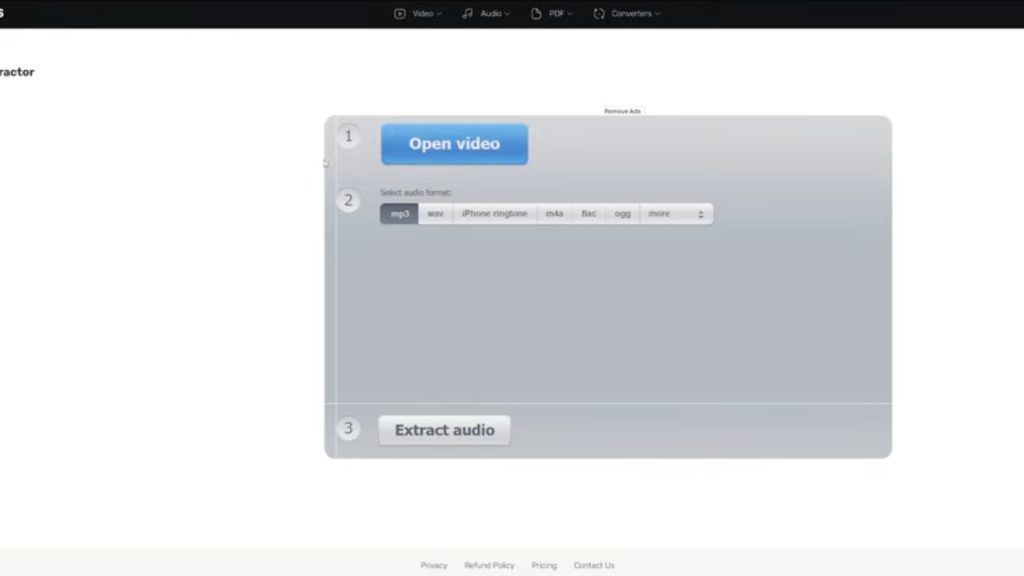
Sometimes the audio you want is trapped inside a video. Maybe you recorded a lecture, filmed a live performance, or want to save just the audio from a YouTube clip. This is where an audio downloader youtube feature becomes valuable. Instead of keeping a large, unnecessary video file just to access the sound, a good converter allows you to strip the audio out completely.
This process typically works by pasting a video link or uploading a video file directly. The tool then isolates the audio track, letting you save it separately as an MP3, WAV, or another format of your choice. This is especially handy for:
- Saving background music or interviews for offline listening
- Creating a podcast clip from a recorded video
- Extracting audio to use in your own creative projects (as long as you respect copyright rules)
Because video files are often much larger than audio files, extracting just the sound also saves valuable storage space on your device.
Advanced Settings
While the basic conversion process is simple, advanced users often want more control. A quality audio converter typically includes optional settings such as:
- Bitrate adjustment – Choose a higher bitrate for better sound quality or a lower one to save file size.
- Sample rate control – Fine-tune the audio for professional editing or specific playback devices.
- Channel selection – Convert between mono and stereo depending on your needs.
- Trimming and cutting – Remove unwanted sections before finalizing the conversion.
- Volume normalization – Balance out audio levels so the final file sounds consistent.
These advanced options are optional, so beginners can ignore them and rely on default settings, while more experienced users can fine-tune every detail of the final output. This flexibility is what separates a basic tool from a truly professional-grade audio converter.
Batch Conversion
If you regularly work with multiple audio files, converting them one at a time can be tedious. Batch conversion solves this problem by allowing you to upload several files at once and convert them all together in a single process. Instead of repeating the same steps over and over, you simply:
- Upload multiple audio or video files.
- Select your desired output format for all of them.
- Start the conversion process once.
- Download all converted files together, often in a single compressed folder.
This feature is especially useful for podcasters, musicians, content creators, and anyone managing a large media library. It turns what could be an hour-long task into something that takes just a few minutes.
Works in a Browser
A major benefit of using a modern audio converter is that it works entirely inside your web browser. There is no need to download or install anything, which means:
- No risk of installing unwanted software or malware
- No storage space taken up on your device
- Compatibility with Windows, Mac, Linux, Android, and iOS
- Instant access from any device with an internet connection
Because everything happens in the cloud, you can start a conversion on your laptop and finish it on your phone if needed. This browser-based approach also means the tool is constantly updated behind the scenes, so you always have access to the newest features without doing anything yourself.
Convert Audio Easily
Ease of use is one of the most important factors when choosing an audio converter. The best tools are designed with a clean, simple interface so that anyone, regardless of technical skill, can convert a file in just a few clicks. You should not need a tutorial or manual to figure out how to use it. Drag-and-drop upload areas, clear format selection menus, and a single “convert” button are usually all it takes.
This simplicity does not mean the tool lacks power. It simply means the complexity is hidden behind the scenes, so the technical work happens automatically while you focus on getting your file ready to use, whether that is for a school project, a music playlist, a podcast episode, or professional audio work.
Free & Secure
Cost and safety are two of the biggest concerns people have before uploading personal files online. A trustworthy audio converter should be:
- Free to use for standard conversions, without hidden charges or forced subscriptions
- Secure, using encrypted connections so your files are protected during upload and download
- Privacy-respecting, automatically deleting uploaded files after a short period rather than storing them indefinitely
When a service is transparent about how it handles your files, you can convert audio without worrying about your personal recordings, music, or podcasts being misused or stored without your knowledge. Always look for clear privacy information before uploading anything sensitive.
Free Online Audio Converter & Enhancer
Beyond basic conversion, many modern tools now double as an enhancer, improving the quality of your audio while changing its format. This might include:
- Reducing background noise
- Boosting clarity for spoken-word content like podcasts or interviews
- Balancing volume levels across a track
- Sharpening audio that was recorded in a noisy environment
Combining conversion and enhancement into one free online audio converter means you do not need separate software for each task. Whether you are converting audio to mp3 for a playlist, using an audio downloader youtube feature to save a favorite clip, or simply cleaning up a recording before sharing it, a single tool can handle the entire process from start to finish.
Final Thoughts
A reliable audio converter is one of those tools that quietly saves you time again and again. From converting formats and extracting audio out of video files, to batch processing multiple files and enhancing sound quality, the right online tool covers nearly every need without requiring downloads, technical expertise, or payment. Because it works directly in your browser, is secure by design, and remains completely free for everyday use, it is a practical solution whether you are a student, podcaster, musician, or simply someone who wants their audio files to work exactly the way they should.
The next time you find yourself stuck with an audio file in the wrong format, or audio trapped inside a video, remember that a good audio converter can solve the problem in just a few clicks — no technical background required.


